A Weekly Cash Flow Forecast Built Inside NetSuite
Last verified November 7, 2026 NetSuite’s Cash Flow Statement tells you where your cash went. It doesn’t tell you where it’s going next week. For an audio-visual equipment distributor, we built a custom weekly cash flow forecast that lives right in NetSuite. It starts from the current bank balance and projects cash in and cash…
Last verified November 7, 2026
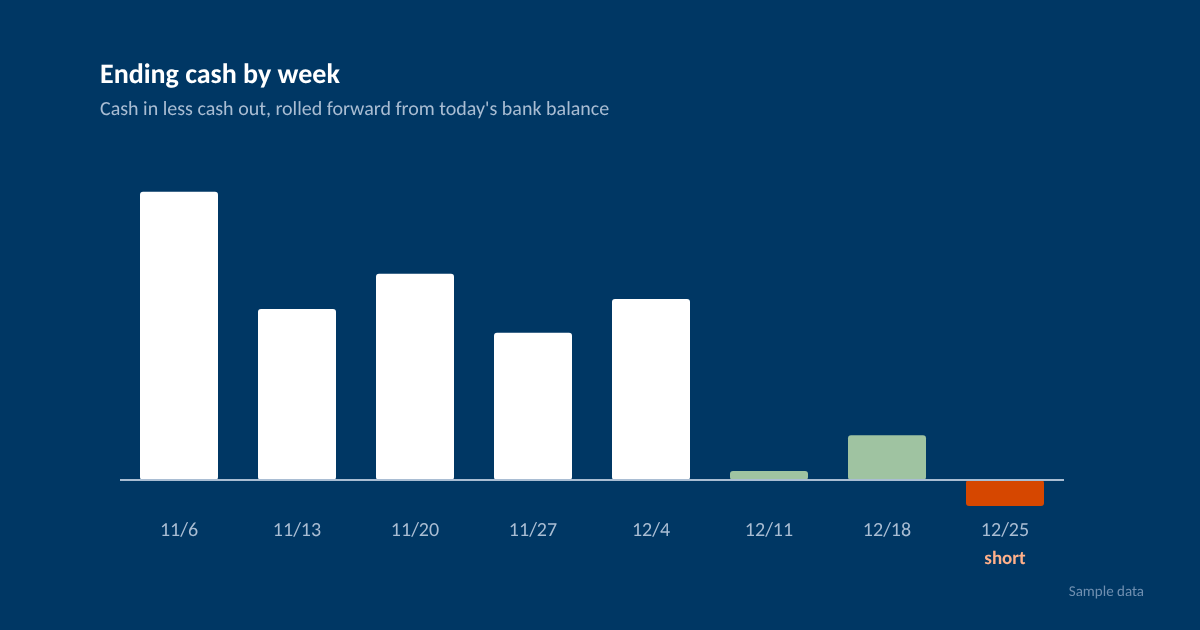
NetSuite’s Cash Flow Statement tells you where your cash went. It doesn’t tell you where it’s going next week. For an audio-visual equipment distributor, we built a custom weekly cash flow forecast that lives right in NetSuite. It starts from the current bank balance and projects cash in and cash out for the weeks ahead, using the open transactions already in the system. It shows up as full-page view. It’s custom SuiteScript, not a SuiteApp, so it’s built and tuned to the account.
Why a spreadsheet wasn’t cutting it
Most companies we talk to forecast cash in Excel. Somebody exports open AR and AP, pastes it in, and adjusts by hand. It works until it doesn’t. The export is stale by Tuesday, and every week starts over from scratch.
The goal here was simple. Open the dashboard Friday morning and see whether any week coming up runs short.
Why not just use NetSuite’s Cash 360?
Check Cash 360 first. It’s Oracle’s cash forecasting SuiteApp, it’s free, and it may be all you need. Once it’s installed, you’ll find it at Financial > Cash 360 > Dashboard. It covers a lot:
- Forecasts by day, week or month, starting from your bank balance
- Open invoices, bills, sales orders and purchase orders
- Undeposited funds
- Account categories that forecast from your GL history using a recent monthly average
- Additional values for one-off or repeating items, like a loan payment
For this client, a few things didn’t fit:
- Payroll. Payroll runs on a pay cycle, not a calendar month, and commission runs are much bigger than regular ones. A monthly average smooths that out, so a short week can hide.
- Order timing. Cash 360 dates sales orders and POs by a billing lead time plus terms. This client wanted expected ship and receipt dates, plus vendors who get paid when the PO is placed.
- Loose ends. They wanted stale POs, old sales orders and stuck deposits pulled out and listed, not counted.
- Checking the forecast. They wanted each week’s forecast saved and compared with what actually hit the bank.
If Cash 360 fits how you bill, buy and pay, use it. If it doesn’t, that’s where a custom build makes sense.
What the forecast pulls from NetSuite
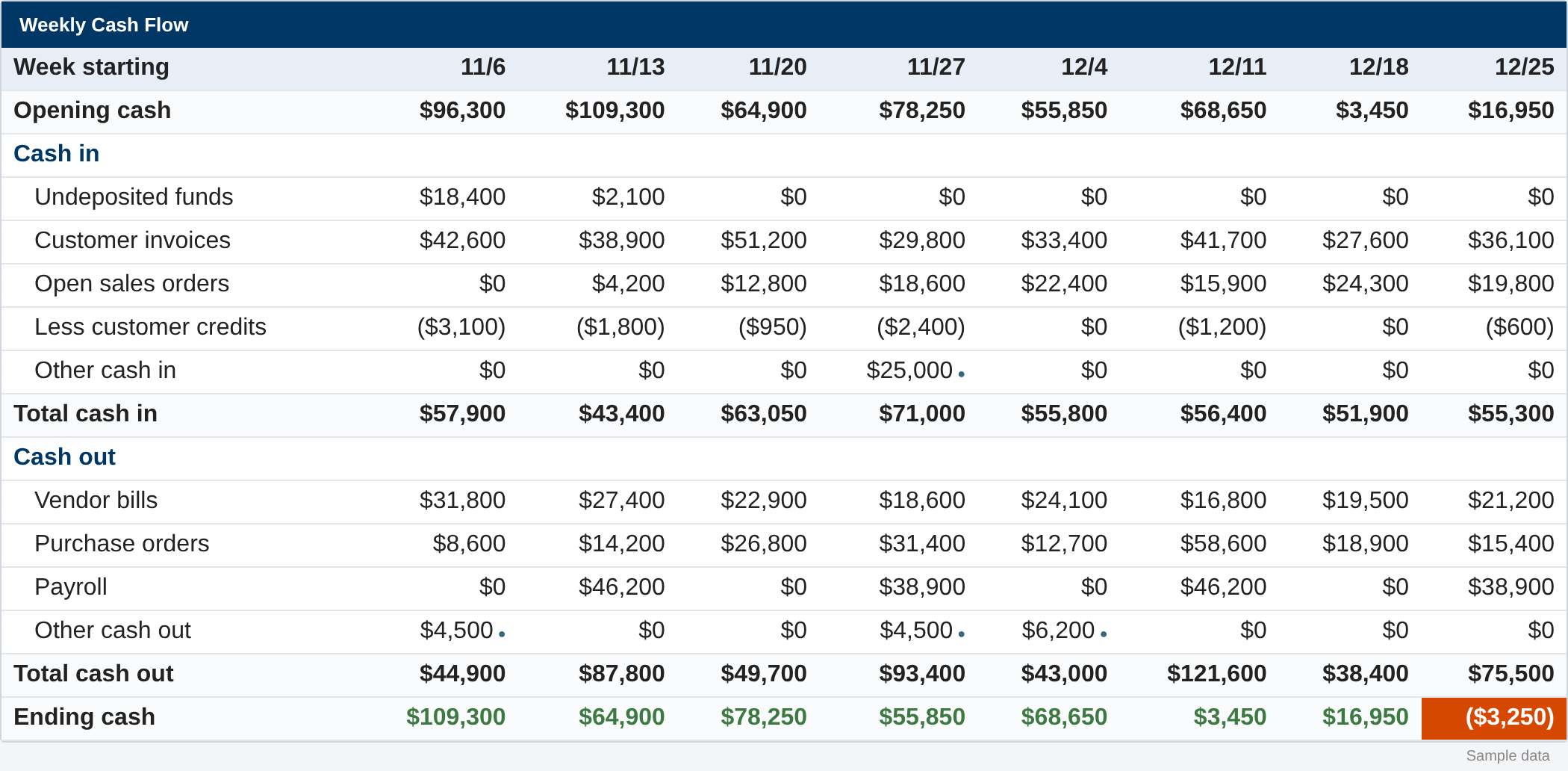
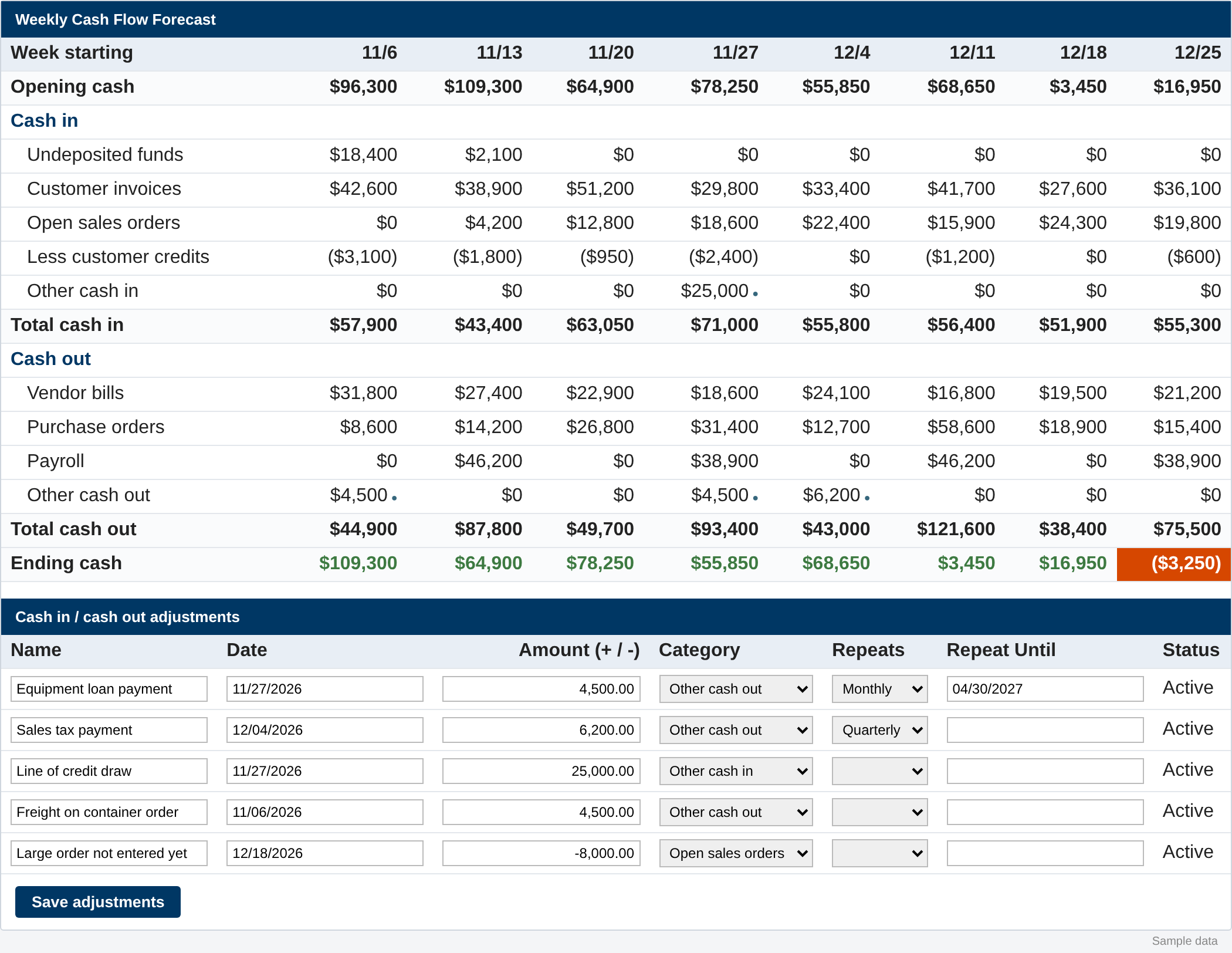
Every number comes from records that already exist. The grid recalculates each time the page loads.
Cash in
- Undeposited funds. Payments received but not deposited yet, expected to hit the bank a few days after the transaction date.
- Customer invoices. Open invoices, dated by when that customer actually pays, not just the due date.
- Open sales orders. Orders not billed yet, using the expected ship date plus the customer’s terms.
- Less customer credits. Credit memos, unapplied payments and customer deposits, applied against that customer’s open invoices.
- Other cash in. Manual adjustments.
Cash out
- Vendor bills. Open, approved bills.
- Purchase orders. Open, approved POs, using the expected receipt date plus vendor terms.
- Payroll. An estimate based on recent pay runs.
- Other cash out. Manual adjustments.
Each week shows opening cash, total in, total out and ending cash. A week that ends short is highlighted.
Dating invoices by how customers really pay
Due dates are a guess. Customers have habits. The forecast looks at each customer’s recent payment history and figures out their average days to pay, weighted by dollars. If a customer doesn’t have enough history, it falls back to the invoice due date.
Past-due invoices get pushed forward into the grid instead of piling up in the first week. Really old ones are left out and listed separately, since they probably aren’t coming in on schedule.
Handling the messy stuff
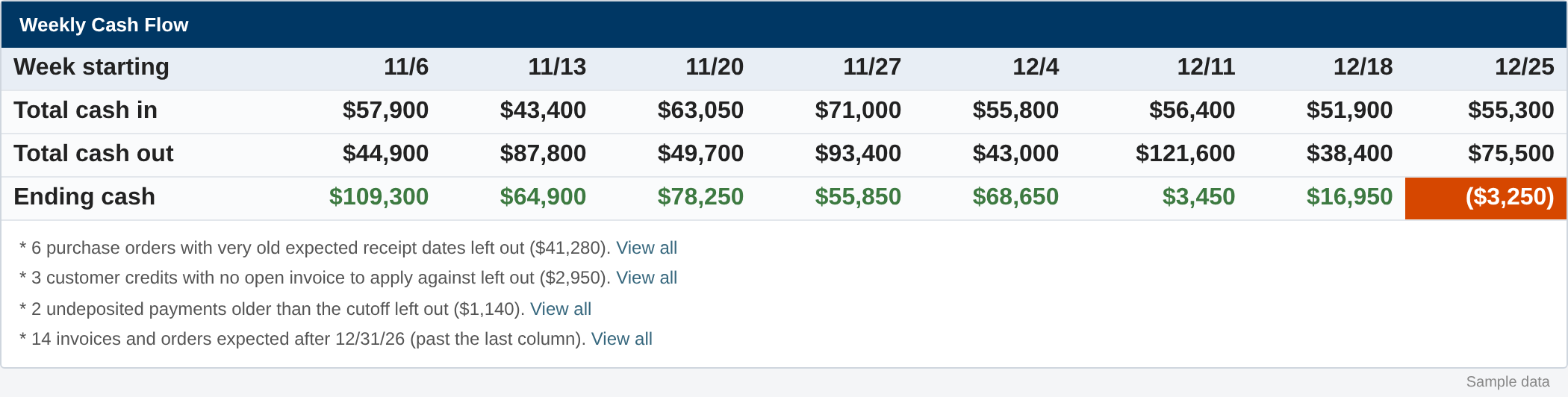
Real data has loose ends. Instead of quietly including or dropping them, the forecast leaves them out and adds a footnote with a count and a “View all” link. That covers things like:
- POs with a very old expected receipt date. These are usually dead, or received and never billed. If a linked sales order is still open, the PO stays in.
- Sales orders with a very old ship date.
- Customer credits with no open invoice to apply against.
- Old undeposited payments, which are likely stuck.
- Anything expected after the last column.
That footnote list doubles as a cleanup list. It’s a quick way to find old POs and stuck deposits that should’ve been closed out months ago.
Vendors you pay up front
Some vendors want payment when the PO is placed. For those vendors, the forecast moves the cash out to the PO date and subtracts any vendor prepayment already recorded against the PO. Everyone else follows the normal receipt date plus terms.
Estimating payroll that runs outside NetSuite
This client runs payroll outside NetSuite and records it by check and journal entry. So the forecast reads the payroll GL accounts instead. It knows the pay schedule and splits pay dates into commission runs and regular runs, since they’re very different amounts. Each type is estimated from the most recent runs of that type.
Card charges to those accounts are left out, since they’re paid through the card and not from the bank.
Manual adjustments for what NetSuite doesn’t know
There’s always something that isn’t in the system yet. A loan payment, a tax payment, a big order that’s coming but not entered. The full-page view has an editable grid for these:
- Name, date and amount
- Category, which picks the forecast row it rolls into
- Repeats (weekly, every 2 weeks, monthly, quarterly or annually) and a Repeat Until date
You can edit several lines and save once. Moving an adjustment to another week is just changing its date. Removed lines are set inactive, not deleted.
Checking the forecast against what actually happened
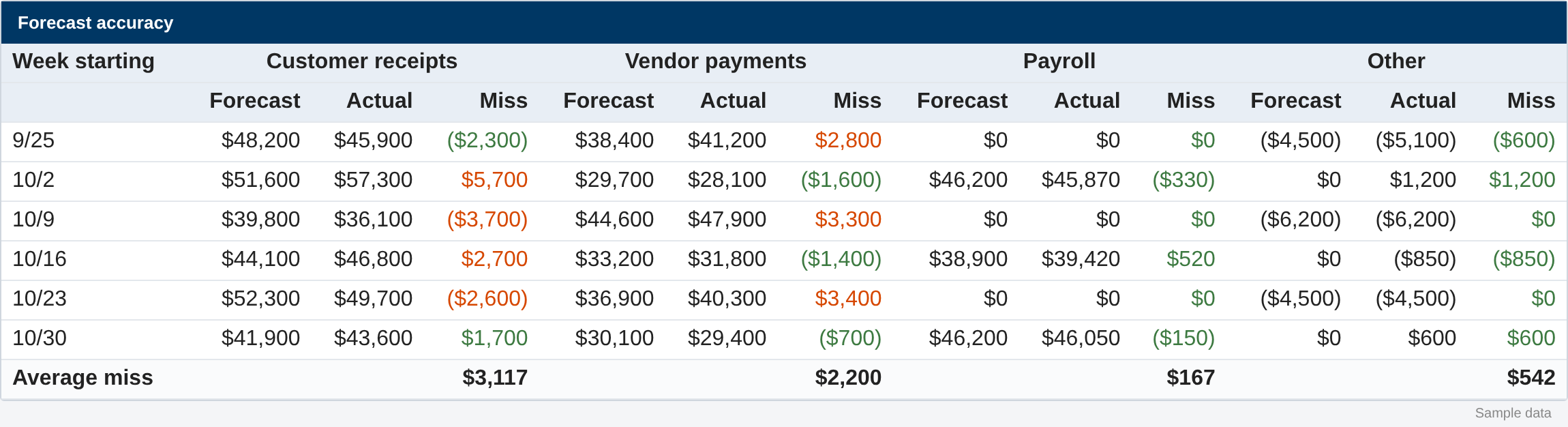
A forecast you never check is just a guess. A scheduled script saves a snapshot of the forecast every Friday morning. Later, the forecast page compares what was projected for each week against what actually hit the bank, broken out by customer receipts, vendor payments, payroll and other. It shows the average miss for each, so you can see which piece needs tuning.
How it’s built
For admins who want to know what’s under the hood:
- A shared SuiteScript 2.1 library holds all the logic and settings, using SuiteQL.
- A Suitelet call that library.
- A scheduled script saves the weekly snapshot.
- Two custom records hold adjustments and snapshots.
All the assumptions sit in one settings block at the top: weeks shown, the day the week starts, days to bank a deposit, how old is too old, default terms, payroll accounts and so on. Changing an assumption means changing one line, not rewriting code.
Is this a fit for you?
It’s a good fit if you’re running NetSuite, you check cash weekly, and your forecast lives in a spreadsheet somebody rebuilds by hand. Every account is set up a little differently, so the settings and some of the logic get tuned to how you actually bill, buy and pay.
Want to talk?
If your cash forecast still lives in a spreadsheet somebody rebuilds every Friday, tell us what goes into it now. We’ll help you figure out what NetSuite can fill in for you. Book a free hour.