
One of the more annoying features of Netsuite is the inability to get rid of their name & branding from a Netsuite-hosted e-commerce web site. The shortcut icon (that little graphic that shows up next to the site title when you create a bookmark)
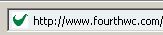 Shortcut Icon
defaults to a Netsuite ‘N’ graphic. I’ll show you how to overwrite that with a custom icon. You will first need a 16×16 pixel graphic named favicon.ico. If you don’t know how to make one, here is a tutorial.
Two Ways to Skin a Cat
I’m not really sure why it’s important that there are so many options in the feline-skinning world, but I guess it’s nice to know. To create your custom icon, I recommend both (if possible).
By default, browsers will look for the shortcut icon in the root of a web site. So for my site, the favicon would be located here:
https://www.fourthwc.com/favicon.ico
If you have Netsuite 11, you can upload this image to the root of your file cabinet under web site hosting files > live. If not, just put it under web site hosting files > live > site.
Specifying the Favicon in a Meta Tag
If you uploaded your favicon to the root of your web site, it should show up most of the time. However, sometimes the user is on a Netsuite domain. Here is how to make sure your icon is always displayed. In the ‘additions to head’ field under setup web site > site templates, add the following line:
<LINK rel="shortcut icon" href="https://checkout.netsuite.com/c.411534/favicon.ico" type="image/x-icon">
Note: Make sure to get the correct URL by editing the file in the file cabinet – NetSuite will show you various forms that the file’s URL can take. It’s best to use the secure version as I have, so users won’t see a warning about insecure content when on secure pages.
That’s it! Pretty easy to do, and a nice touch to have (and less confusion for your users).
More from Fourth Wave
 BatchIt (Reconcile Amazon Batch Payments With Ease)
 Netsuite 2020.2 Update: Data-center URL deprecation + What You Need To Know
 Site Builder Performance Upgrades
 NetSuite Announces Plans to End Promotion Functionality for Site Builder
 Protect Your Online Forms from Bots & Spam
 What to know about schema.org and microdata tagging


David Norris
Latest posts by David Norris (see all)
- NetSuite Announces Plans to End Promotion Functionality for Site Builder - January 16, 2020
- Most NetSuite Websites Are No Longer Tracking Safari Conversions for Adwords - November 20, 2017
- Make Your NetSuite Site Builder Site Secure – HTTPS Throughout - May 28, 2017
- An Introduction to Automating XML Sitemaps for NetSuite Companies - November 13, 2016
- An Introduction to NetSuite’s Reference Checkout & My Account Bundles - April 18, 2016
Thanks for putting this “out there”. This puzzled me for months now I have a nifty favicon. Now. If only I could figure out how to put the Google XML Site Map into the Root directory …. : ) Any idea if this is possible in Version 11? Keep up the good work.
David,
Is there any way to make a favicon work on IE? I see yours does not work on IE either.
Tom,
IE is a little strange. You have to create a bookmark for a site in order to have the shortcut icon appear. I’ve tested my site in IE on a number of machines and it works, as long as you create a bookmark.
-David
Where your article says “However, sometimes the user is on a Netsuite domain. Here is how to make sure your icon is always displayed. In the ‘additions to head’ field under setup web site > site templates, add the following line:”
that next section is currently blank … what is supposed to be there?
Hello Polly,
Thank you for the comment. The example link I put in was being treated as HTML instead of as text, so I’ve fixed it.